
DynamicDrive
National General InsuranceAuto & Vehicles
4.3697.00 Reviews
- Version
- 3.8.1
- Installs
- 100.00K
- Age Rating
- Everyone
Screenshots
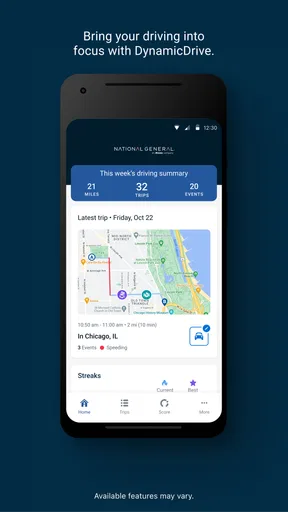
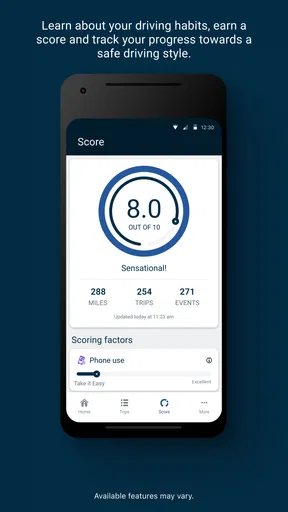
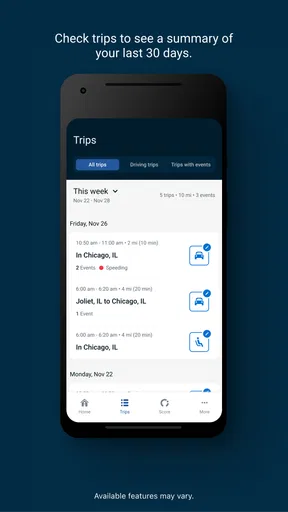
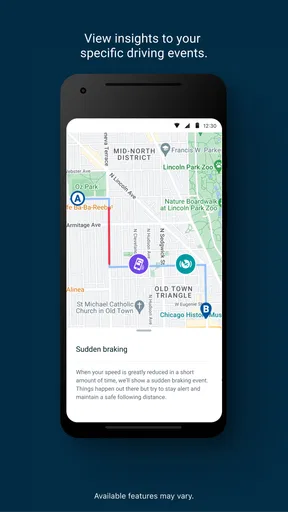
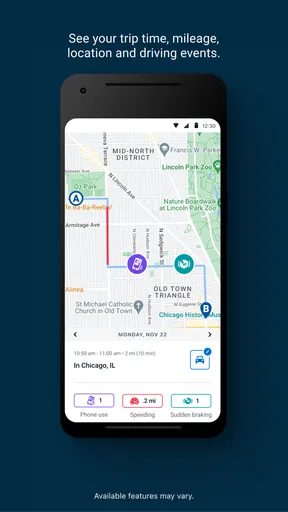
Our Review of DynamicDrive
 Analysis by Appyee
When I review a driving app, I look beyond the promise of saving money. The more important question is whether the app gives me enough control to understand what it is doing while I drive. DynamicDrive, from National General Insurance, takes that approach by focusing on behind-the-wheel behavior and using the experience to encourage safer habits. It is a free app in the Auto & Vehicles category, available to everyone, and its central idea is simple: pay attention to how you drive, then use that feedback to make better decisions.
I found the concept more useful than a basic insurance advertisement because it asks me to examine my own driving instead of simply presenting a quote. That said, it is not a general-purpose navigation tool, a repair assistant, or a replacement for an insurance policy. Its value depends on whether I am comfortable with a driving-focused service connected to an insurer and willing to make sense of the feedback it provides.
What DynamicDrive is really trying to do
The app’s store summary describes a system for monitoring behind-the-wheel behavior so drivers can become safer and save. In practice, that places DynamicDrive somewhere between a personal driving journal and an insurance-related behavior tool. I would use it with a specific goal: identify habits that may be easy to ignore during a normal commute, such as rushed decisions, abrupt changes in speed, or a tendency to treat familiar roads casually.
That distinction matters. A navigation app helps me get somewhere, while a vehicle-maintenance app helps me manage the car itself. DynamicDrive is about the driver. It is intended to turn ordinary trips into information I can review later, rather than leaving every journey as a vague impression of whether I drove well.
The app was released on November 1, 2024, and its current version is 3.4.0. It requires Android 10 or later, so owners of older phones should check compatibility before planning around it. On Google Play, it has a 4.4 average from around eight thousand ratings, with more than one hundred thousand installs. Those figures suggest a meaningful early user base, although they do not tell me whether the experience will suit a particular driving routine.
One thing I appreciate is that the app’s purpose is narrow enough to understand quickly. I am not asked to learn a large collection of unrelated tools. The trade-off is that a narrow purpose also means the app may feel limited if I want roadside assistance, fuel prices, maintenance reminders, route planning, or a complete vehicle record in the same place.
Why the insurer connection deserves attention
National General Insurance is the developer, so I would approach DynamicDrive differently from an independent driving diary. The insurer connection may make the app relevant to people who are already customers or who are considering insurance-related savings, but it also makes trust and transparency especially important. Before I begin, I would read every explanation shown during setup rather than tapping through the screens automatically.
My advice is practical: note what the app asks me to enable, what choices it presents, and whether I can review or change those choices later. I would also check how the app describes driving information, account access, and any connection to insurance decisions. I would not assume that a safer-driving score automatically guarantees a particular result. The app can encourage better behavior, but insurance outcomes depend on the terms and process presented to the user.
This is one of the clearest differences from a standalone habit tracker. With a private driving journal, the information mainly serves my own reflection. With an insurer-developed app, I need to understand the user-facing choices before I treat the feedback as casual entertainment. That is not a reason to avoid DynamicDrive; it is a reason to use it deliberately.
Controls I would check before the first trip
Because the app monitors driving behavior, the setup stage is not a minor formality. I would look for clear explanations of what must be enabled for the app to work, whether monitoring can be paused, and how to stop using the service if I change my mind. I would also confirm which account I am signing into and whether the app offers a way to manage that account without relying on guesswork.
These checks are useful even when the app presents them clearly. Driving data is collected during moments when I am focused on traffic, so I want the choices to be understandable before I leave home. If I were setting it up for a family member, I would help them complete the permissions and account steps while the car is parked, not at the start of a journey.
I would also avoid treating the app’s feedback as a perfect record of every road situation. A driver may slow sharply because a pedestrian steps into the road, because traffic suddenly stops, or because a road surface changes. A behavior-monitoring app can provide a pattern to consider, but I should still interpret individual events in context. That is an important trade-off: objective-looking driving information can still require human judgment.
A realistic commute and what I would do with the feedback
Imagine I use DynamicDrive for the trip to work. The route is familiar, so I may accelerate more quickly than I realize when traffic lights change. At the end of the day, I would not simply glance at a result and decide that I am either a good or bad driver. I would compare the feedback with the journey itself. Was traffic unusually heavy? Did I take a different road? Was there roadwork or a sudden obstruction?
After several ordinary trips, I would look for repeated patterns instead of reacting to one unusual drive. If the same type of event appears again and again, I could make a small change: leave more space, begin slowing earlier, or stop treating a familiar stretch as permission to rush. This is the most valuable use I see for the app. It turns a general intention to drive safely into a review habit connected to real journeys.
A second useful scenario is a new driver who wants structured encouragement without being handed a long driving manual. A parent or mentor could discuss the feedback after the car is parked and use it as a starting point for conversation. The app would not replace supervised practice or sound instruction, but it could make otherwise forgettable habits easier to discuss.
There is also a less obvious use for experienced drivers: checking whether confidence has become complacency. Someone who has driven the same commute for years may believe the route is effortless, yet familiarity can reduce attention. Reviewing behavior over normal trips may reveal that the driver needs to rebuild a calmer routine, especially during busy periods.
Where the experience may become frustrating
The biggest limitation is that monitoring can feel intrusive or demanding if I only want a quick insurance tool. I would not recommend DynamicDrive to someone who dislikes behavior-based services on principle or who is unwilling to review the choices presented during setup. The app’s usefulness depends on accepting that driving information is part of the experience.
It may also be a poor fit for someone who drives rarely, changes vehicles often, or spends most of the time as a passenger. A driving-monitoring tool needs enough relevant use to reveal meaningful patterns. Occasional journeys may not give me a useful picture, and a single unusual trip could dominate my impression if I interpret it too seriously.
Another limitation is the emotional effect of scores or feedback. Some drivers may find it motivating, while others may become anxious and focus on chasing a perfect result rather than driving attentively. I would treat the app as a coaching aid, not a competitive game. Safe decisions should come first, even when the road situation makes a journey look less tidy in the app.
Phone compatibility is another practical checkpoint. The minimum operating system is Android 10, which is reasonable for many current devices but excludes older phones. If my phone is not supported, I would not try to force the issue with unofficial workarounds. A driving app must be stable and predictable, especially when it is intended to operate around travel.
How it compares with familiar alternatives
Compared with a navigation app, DynamicDrive is less useful for planning a route and more useful for reviewing how I handled the route. I would keep a navigation tool if I need traffic guidance, directions, or destination search. DynamicDrive makes more sense beside that kind of app, not instead of it.
Compared with a vehicle-maintenance app, the focus is also different. Maintenance software can help organize service records or reminders, while DynamicDrive centers on behavior behind the wheel. Someone looking for tire information, repair history, or fuel tracking should choose a tool built for those tasks.
Compared with a manual driving diary, the appeal is convenience. I do not need to remember every part of a journey and write it down afterward. The cost of that convenience is reduced personal control over how the driving information is gathered and interpreted. A diary is slower but more private from the user’s perspective; DynamicDrive is more practical for noticing patterns without taking notes.
Compared with an insurer’s ordinary mobile account tools, DynamicDrive appears more focused on the driving experience itself. If my only goal is to view policy information or manage routine insurance tasks, I would choose the service that handles those tasks directly. If I want to examine my habits and understand how a driving-focused program fits into my insurance relationship, this app is the more relevant option.
How I would use it responsibly
I would install it before a calm, stationary setup session, not while preparing to pull away. I would read the permission prompts, account explanations, and any visible choices carefully. If a setting is unclear, I would wait until I could understand it rather than accepting it automatically. This simple step improves both safety and confidence.
For the first period of use, I would keep my routine normal. I would not deliberately take difficult roads merely to test the app, and I would not change my driving style in a way that creates risk just to improve a result. The most useful information comes from ordinary trips, because that is where repeated habits appear.
I would review feedback only when parked. This sounds obvious, but it is worth stating because a driving app can tempt users to look at the phone at the wrong moment. Any comparison between trips should happen away from traffic, with enough time to remember what actually happened on the road.
I would also separate three questions: Did I drive safely? What pattern did the app show? What does that pattern mean for my insurance situation? The first is a road-safety judgment, the second is a technology output, and the third depends on the terms and choices presented by the insurer. Keeping those questions separate prevents me from treating an app result as a complete verdict on my driving or coverage.
Who should try it, and who should skip it
DynamicDrive is a sensible choice for an existing or prospective National General Insurance user who wants to examine driving habits through regular trips. It is also suitable for someone who appreciates small, measurable prompts and is willing to review the app’s controls before using it. Newer drivers may find the feedback helpful as a conversation starter, while experienced drivers can use it to challenge assumptions about familiar routes.
I would skip it if I am searching for navigation, emergency roadside help, maintenance management, or a broad car-ownership dashboard. I would also skip it if I am uncomfortable with an insurer-developed behavior-monitoring experience or if I expect every result to account perfectly for weather, traffic, passengers, road design, and unexpected hazards.
The free price removes a financial barrier to trying it, and the Everyone content rating makes it broadly accessible. Still, free does not mean consequence-free: my time, attention, and comfort with the app’s data choices matter. I would make the decision based on those factors rather than installing it simply because there is no purchase price.
My cautious verdict
DynamicDrive is most convincing when I treat it as a reflection tool, not a magic savings button. Its strongest idea is to make everyday driving behavior visible enough to discuss and improve. The connection with National General Insurance gives the app a clear purpose, but it also means I would pay close attention to account controls, permission choices, and the explanations shown during use.
I like the possibility of learning from repeated journeys rather than relying on memory. I also like that the app can support practical conversations between a driver and a mentor. At the same time, I would not overread one trip, chase a perfect score, or assume that safer behavior alone settles an insurance question.
With a 4.4 average from roughly eight thousand ratings and more than one hundred thousand installs, it has attracted substantial interest for a relatively recent app. Those figures are useful context, but my recommendation remains conditional: try it if you want driving-focused feedback and are comfortable making informed choices about the service. Choose a navigation, maintenance, or private journaling alternative if that is the job you actually need done.
For me, the deciding factor is user agency. If I can understand what DynamicDrive asks of me, review its feedback safely while parked, and keep the insurer relationship in perspective, it can become a practical addition to a driving routine. If those controls or expectations feel uncomfortable, skipping it is the more sensible choice.
Privacy and Permissions
See what permissions an app requests and how it handles your data.
- Contacts
- read your contacts
- Location
- approximate location (network-based), precise location (GPS and network-based)
- Phone
- directly call phone numbers, read phone status and identity
- Wi-Fi connection information
- view Wi-Fi connections
- Device ID & call information
- read phone status and identity
- Other
- view network connections, pair with Bluetooth devices, full network access, run at startup, control vibration, prevent device from sleeping
Verdict
Strengths of DynamicDrive
- Keeps favorite music and video services accessible from one dashboard.
- Simple interface makes switching between supported services quick.
- Useful for users who regularly manage several entertainment accounts.
- Can reduce the need to search for individual apps or websites.
- Responsive navigation provides a smooth experience on compatible devices.
Limitations of DynamicDrive
- Supported services may vary by region or change without notice.
- Some features may require separate subscriptions to connected services.
- App usefulness is limited if your preferred platform is not supported.
- Background activity could affect battery life during extended sessions.
- Privacy permissions should be reviewed before connecting personal accounts.
Other Releases by National General Insurance
View All
Direct Auto Insurance
Finance4.6

National General
Finance4.6
Similar Picks in This Category
View All
Android Auto
Google LLC4.1

maxim — order a taxi & food
PT. SITO4.7

Штрафы ГИБДД: проверка с фото
Pays LLC – Штрафы ГИБДД4.7

Номерограм – проверка авто
Авто Ассист4.8

Дром Авто
Дром4.9

Frequently Asked Questions
What is DynamicDrive, and what can I use it for?
DynamicDrive is designed to provide a more flexible and personalized experience for managing or interacting with digital content, depending on the version available on Android or iOS. Before downloading, users should review the app’s specific store description because features, supported services, and available tools may vary. In general, it is best suited to people looking for a convenient mobile solution with settings that can be adjusted to their preferences.
Is DynamicDrive free to download and use?
DynamicDrive may be available as a free download, but some functions could require in-app purchases, a subscription, or access to a premium plan. The free version may also include advertising or limitations on certain tools. We recommend checking the current Google Play or App Store listing before installing, since pricing, trial periods, subscription terms, and regional availability can change over time.
Is DynamicDrive safe and compatible with my device?
The safest way to install DynamicDrive is through the official Google Play Store or Apple App Store rather than from an unknown third-party website. Check the listed developer, recent reviews, requested permissions, and minimum operating-system requirements before downloading. Compatibility can differ between devices, and older phones or tablets may not support every feature or provide the same performance as newer hardware.
Does DynamicDrive require an internet connection?
DynamicDrive’s internet requirements depend on the features you use. Basic settings or previously stored information may work offline, while synchronization, account access, cloud-based tools, updates, or online content generally require Wi-Fi or mobile data. If you have a limited data plan, review the app’s permissions and settings after installation, and disable background data usage if the app provides that option.
What should I know about privacy and account requirements before installing DynamicDrive?
Before using DynamicDrive, review its privacy policy and the permissions requested during setup. The app may require an account, email address, device access, storage permissions, or other information depending on its functionality. Only grant permissions that appear necessary, and check whether data is synchronized or shared with third-party services. Users should also confirm how to delete their account or stored information if they stop using the app.
